

SCAM ALERT
Some of our members have reported receiving emails purporting to come from our previous President, Russell Hopkins, requesting them to buy Apple gift cards. This is a scam.
If you receive one do not open and delete immediately.
Campus Communique‘s Technology News section features up-to-date information from reliable sources about what’s happening in the IT world, with an emphasis to staying safe online.
This page provides links to reliable resources and useful information.
If you have an area you would like to see covered on this website, please contact web_manager@u3aredcliffe.org.au.
Resources
The following organisations are trusted sources of useful information to help us use our devices and stay safe online.
Be Connected
Be Connected is run by the federal government’s eSafety Commissioner. It provides a wealth of information and short online courses, all aimed at providing older Australians with relevant and up-to-date information about day-to-day online activities.
Cyber.gov.au
Cyber.gov.au, run by the Australian Signals Directorate, has valuable advice and information about how to protect yourself online.
You can also subscribe to their newsletter to keep up-to-date with cyber-security issues.
ID Care
IC Care is an independent not-for-profit and the only service of its kind globally, offering expert support and frontline insights into scams, identity theft, and cybercrime.
Useful information
How to backup your smartphone
We all know how important it is to backup our computers. What about the one you keep in your pocket or handbag? The one otherwise known as your phone. The one where you have photos and messages and contact details.
This article from Wired provides relevant information for both Android and Apple users.
How to spot AI-based visual disinformation
It also has a quick quiz to check how good you are at spotting fakes.
Housekeeping emails
Every time U3A Redcliffe sends out the fortnightly Campus Communique, there are a number of ‘bounces’, because the intended recipient’s email inbox is full and the data allowance has been exceeded.
Different email applications handle data allowances in different ways. If you do not clean out your inbox from time to time you may stop receiving emails because there is no more space available.
You can learn more about data and data management on Be Connected.
Even if you do delete old and unwanted emails, you may need to empty your deleted items folder/trash bin. Some email services, such as Gmail, automatically empty items after a specified period. In the case of Gmail, this is 30 days. However, other email services may not do this and your deleted items area just gets fuller and fuller. It’s a bit like putting your rubbish in the kitchen bin but not taking it out to the garbage bin so Council can come along and take it away.
If you have a lot of old emails in your inbox or deleted items area, going through them one by one can be very time consuming. You can, however, select a range of emails easily and delete them with just one tap of your ‘delete’ key or icon.
Click here to view a YouTube video on how to select multiple email in Gmail. Other email applications will probably work in the same way.
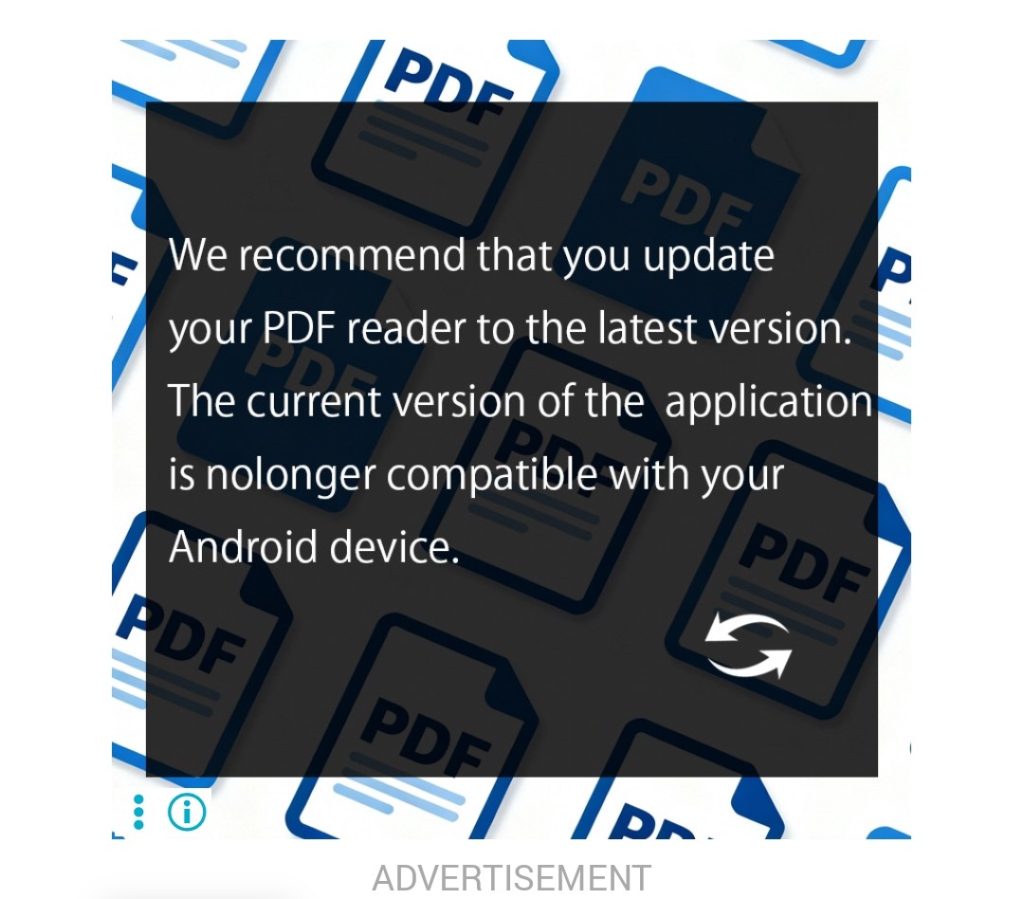
Fake app update and security alerts
If you go online to read the newspapers or play games, watch out for fake alerts telling you to update apps or other software.
The image to the left is a screenshot taken from the Courier Mail app. It does include the word ‘ADVERTISEMENT’ in light grey under the image, but this is hard to read on a small device because of the pale colour and small type size.
Like most hosts, the publisher would not be aware of the type of ad being hosted on their app. They simply sell the space and do not check all the ads that are hosted.
Fake ads may be red, or mimic a classic screen, such as Microsoft’s ‘blue screen of death’. They may look like a real app update or security alert. Or they may flash and emit loud, grating, alarm sounds or other audible warnings. Some will lock your computer screen so the Close button [X] does not work. This last group is designed to generate fear and panic.
Other types install a browser that takes over from your default browser and generates numerous pop up ads.
Whatever you do, do not click anything. Run your anti-virus and a clean-up tool such as CCleaner or Norton Power Eraser or call someone you know can assist you.
AI for Beginners
Originally designed by developer Buzz Usborne as a birthday present for his 75 year-old fatheer, 2 Weeks AI is a free, online, crash course for beginners and a ‘power-up’ for enthusiasts. It needs no technical knowledge. Students receive an email every day for two weeks, delivering bite-size lessons with the aim of making them confident when using AI.
Click here to go to the 2weeks AI website for more information and to enrol.
September 2025
Inserting online pictures and stock images in Microsoft 365 Office applications if options are greyed out
If you are used to using the built-in facility in Office 365 applications, you may have found the Online Pictures and Stock Images options under the Insert tab are greyed out.
Click here to download written instructions on how to turn on these Insert Picture options.
Click here to go to a You Tube clip showing how to turn on Connected experiences.
Views: 526