
Contents:
Learning about technology: Resources
Staying safe online
- Sign up for safety
- 2025 Cyber Breaches
- Has your personal information been compromised?
- Investment Scams
- Scam phone calls and emails
- Scam quiz
- Warning for Gmail users
- Who can I turn to? : Support for identity theft and scams
Tips
- Microsoft 365: How to avoid increase in subscription if you do not want to use Co-pilot (Update: Microsoft has now been ordered to refund users who paid the inflated price for AI software they did not want.)
- Inserting online pictures and stock images in Microsoft 365 Office applications if options are greyed out

Fake app update and security alerts
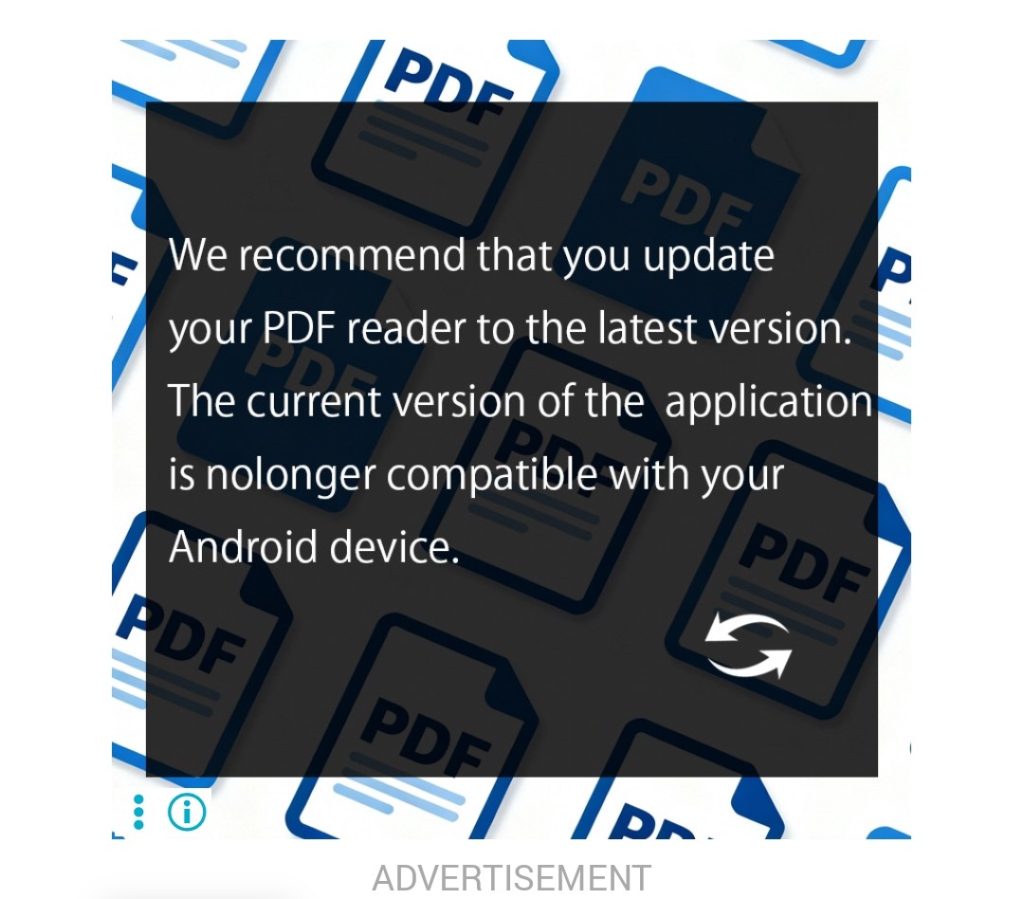
If you go online to read the newspapers or play games, watch out for fake alerts telling you to update apps or other software.
The image to the left is a screenshot taken from the Courier Mail app. It does include the word ‘ADVERTISEMENT’ in light grey under the image, but this is hard to read on a small device because of the pale colour and small type size.
Like most hosts, the publisher would not be aware of the type of ad being hosted on their app. They simply sell the space and do not check all the ads that are hosted.
Fake ads may be red, or mimic a classic screen, such as Microsoft’s ‘blue screen of death’. They may look like a real app update or security alert. Or they may flash and emit loud, grating, alarm sounds or other audible warnings. Some will lock your computer screen so the Close button [X] does not work. This last group is designed to generate fear and panic.
Other types install a browser that takes over from your default browser and generates numerous pop up ads.
Whatever you do, do not click anything. Run your anti-virus and a clean-up tool such as CCleaner or Norton Power Eraser or call someone you know can assist you.
Can you spot the scam?
Scam emails and messages never seem to stop. What is really scary is that they are often very hard to tell from the real deal.
The Australian Signals Directorate has a short quiz which helps you find out how good you are at spotting scams. You can click this link or visit the Australian Signals Directorate and go to the Threats page.
Sign up for safety
Australian Cyber Security Centre and Australian Signals Directorate website provides sound advice on how to protect yourself online.
You can sign up to receive newsletters about cyber threats here.
2025 Cyber Breaches
If you receive any emails or messages which ask you to provide personal information by clicking a link, don’t click through. Your personal information may have been stolen in a cyber attack on an organisation you deal with. The
Data breaches are happening all the time. Hackers typically steal personal information and demand payment for the information to be kept private: otherwise it is leaked on the Dark Web.
Major security breaches, such as Qantas, iiNet and Optus, are usually in the news but others, such as Hertz, Wendy Wu Tours, Natures Organics and Volkswagen may also affect members.
Just a few of the major breaches in 2025 are:
- Western Sydney University – April and October 2025
- Loyola College – September 2025
- iiNet – August 2025
- Scotch College – August 2025
- Belmont Christian College – August 2025
- Metricon Homes – July 2025
- Louis Vuitton – July 2025
- United Australia Party – July 2025
- Qantas – July 2025
- Skeggs Goldstien – June 2025
- The Legal Practice Board of Western Australia – May 2025
- Australian Human Rights Commission (AHRC) – May 2025
- Watkins Steel – May 2025
- Hertz – April 2025
- The Fullerton Hotel Sydney – April 2025
- REST and AustralianSuper – April 2025
- 13Cabs – April 2025
- Vroom by YouX – March 2025
- NSW Department of Communities and Justice – March 2025
- The Australian New Zealand Clinical Trials Registry (ANZCTR) – March 2025
- Wendy Wu Tours – March 2025
- Zurich Insurance – March 2025
- Australian National University – February 2025
- Natures Organics – February 2025
- Christian Community Aid – January 2025
- University of NSW – January 2025
- Volkswagen – January 2025
Investment Scams
As retirees, many of us are interested in investing our money wisely as well as maximising our income from those investments. While the maxim ‘If it looks too good to be true, it probably is’ is as sound as ever, scammers have become very sophisticated and it can be hard to work out is real and what is not.
IDCare monthly newsletter, Cyber Sushi, has a great update on investment scams. Click here to read all about it.
There is also some excellent information on how to tell if a website is legitimate.
October 2025
AI for Beginners
Originally designed by developer Buzz Usborne as a birthday present for his 75 year-old fatheer, 2 Weeks AI is a free, online, crash course for beginners and a ‘power-up’ for enthusiasts. It needs no technical knowledge. Students receive an email every day for two weeks, delivering bite-size lessons with the aim of making them confident when using AI.
Click here to go to the 2weeks AI website for more information and to enrol.
September 2025
Warning for Gmail users
Members who use Gmail and Google Cloud should be aware that they are at risk of phishing attempts after Google’s databases were hacked. While information such as names were leaked, passwords have not been exposed.
The article includes advice on how to protect yourself near the bottom of the page.
This article from PC World contains more information.
September 2025
Scam phone calls and emails
There is a new scam targeting our members. It comes in the form of an email seeking payment for the purchase of gift cards and/or providing personal information.
A similar round of emails was sent to members about twelve months ago.
These emails are not sent through U3A Redcliffe and may be considered a scam. If in doubt, DELETE.
August 2025
Who can I turn to? – Support for identity theft and scams
IDCARE is an independent not-for-profit offering expert support and frontline insights into scams, identity theft, and cybercrime. From its headquarters on the Sunshine Coast it provides a service for Australians and New Zealanders, which is the only one of its kind in the world.
If you suspect you have been scammed or someone has stolen your identity, IDCARE’s experts will assess your situation and develop a tailored plan to help you.
Click here to visit IDCARE ‘s website and find out more about their services. Among its resources are fact sheets on areas such as staying secure using Gmail, Facebook, and iPhones and using Password Managers.
You can keep up to date with what’s happening in cybersecurity and what to watch for in the world of scams by subscribing to their newsletters. You can also keep up to date by following them on Facebook.
July 2025
Inserting online pictures and stock images in Microsoft 365 Office applications if options are greyed out
If you are used to using the built-in facility in Office 365 applications, you may have found the Online Pictures and Stock Images options under the Insert tab are greyed out.
Click here to download written instructions on how to turn on these Insert Picture options.
Click here to go to a You Tube clip showing how to turn on Connected experiences.
_____________________________________________________________________________________________________________
Be Connected:
Free online help

U3A Redcliffe runs a number of courses to help members become computer savvy and expand their existing computer skills. However, there are times when it may be more convenient to hop online to find the answer to a problem or practise a few skills.
The e-Safety Commissioner runs Be Connected, a website full of useful information about using computers and devices. U3A Redcliffe is proud to be associated with this program.
Be Connected has a wealth of useful and relevant information, ranging from free classes for beginners to podcasts with useful information for everyone about topics such as avoiding impersonation scams and how facial recognition is used by banks, airports, and the like as part of their security measures.
Whether you use Microsoft, Android or Apple, there will be something of interest to everyone.
Has your personal information been compromised?
Sadly, we hear all too often about personal information being harvested through data breaches involving some of Australia’s largest corporations. These include Optus in September 2022, where criminals stole
- Names
- Birth dates
- Addresses
- Phone numbers
- Passport information
- Driver’s license numbers
- Government ID numbers
- Medical records & Medicare card ID numbers.
In December that year the Medibank data breach affected over nine million members.
More recently, this year, data breaches have included University of NSW, JB Hi Fi, Natures Organics, Australian National University, Zurich Insurers, Wendy Wu Tours, 13 Cabs, and REST and Australian Super.
You can check whether your personal details have been stolen in a data breach by going to the website Have I Been Pwned?

Simply type your email address in the box and click on the pwned? button.

If you are lucky you will get this message.

If your email has been in a data breach will will get a message similar to this.
Below the results you will see details of the data breaches in which your information has been included.

If your data has been involved in a breach the best thing to do is change your online passwords.
If you suspect your identity has been stolen you can contact ID Care Australia and New Zealand for support and advice.
May 2025
Information for Microsoft 365 subscribers
Update: Microsoft has been fined and ordered to refund subscribers who paid the inflated price to receive the unwanted CoPilot software. Click here to read the ABC’s report.
Members who subscribe to Microsoft 365 (formerly Office 365) will probably have a shock to see a huge increase in the annual fee. This is because of the inclusion of Microsoft’s AI program, Copilot in the subscription.
If you do not want to use Copilot you can change to a ‘Classic’ subscription, which includes the usual Office apps without Copilot. The following information is taken from the Microsoft Support website. Click here to go to that page.
‘Downgrade to Microsoft 365 Personal or Microsoft 365 Family Classic
-
-
Go to Services & subscriptions. Sign in with the Microsoft account associated with your subscription, if prompted.
-
Find your current subscription and select Manage > Cancel subscription
-
To downgrade to another plan with fewer features, select Microsoft 365 Personal Classic or Microsoft 365 Family Classic, or another plan that works for you.
-
Follow the instructions to complete the switch.
-
Your existing subscription might not change immediately, but it will automatically switch to the new plan at renewal. You will not be charged for the new plan until it renews. ‘
March 2025
Views: 315